A Quick Word About Postcards

Although postcards are now virtually obsolete in daily life, I can remember a time when they were used to enter competitions, to cast votes in polls, and to let friends and family know you’d reached your holiday destination safely.

But when I’m going away for a day or two, I like to maintain the last of those traditions. In most cases, I know I’ll arrive back home before the mail does, even when it’s within Great Britain, but it doesn’t diminish the surprise for the recipient.

A typical card measures around four inches by six, although there are wide variations, with the front featuring a picture or design. The back is split into two equal sections, so your text has to fit into that left section because the address and the stamp will take up the right-hand side. You can also buy books of plain postcards where the address and stamp go on the front, allowing use of the entire rear side.

Still, the fixed format forces you to pick your words wisely or to minimise the size of your handwriting. The inventors of the SMS initially chose 160 characters as the limit based upon those restrictions.

In the earliest days of mobile messaging, each one typically cost between 5p and 10p to send; those figures are not adjusted for inflation. Some handsets supported longer messages, but each block or partial block of 160 characters was charged separately.

Despite this, an SMS easily undercut the price of a stamp in the second half of the 1990s – shown by this table from The Great Britain Philatelic Society – especially as you didn’t need to buy a physical postcard either.

The cost of SMS and similar messages today is negligable. Most phone subscriptions have some element of inclusive or unlimited allowance, putting the higher cost into perspective. On a day trip to Birmingham yesterday, I sent just two cards, but they cost me 87p apiece in second-class stamps.

Knowing I might not have a chance later in the day, my intention was to write them both on the flight and post them at the other end. I forgot to take them out of my bag until we were almost ready to land, but they’re both now safely in the post awaiting delivery.
Sitting – I Won’t Stand for It

Five years ago this month, I finally started working from home on account of the pandemic. This was a major change after 14 years being in an office, although the transition was delayed from March because my employer at the time had only had desktop PCs and needed to buy us laptops.

Before this, I’d already been interested in a standing desk. Regular use can help improve your overall health. To this end, I’d experimented with differnt layouts for my own computer, settling on a tabletop stand that could hold a laptop and nothing more.

With the prospect of working from home, however, it was necessary to find room for an external monitor because we used several software applications and it was easier to keep them all on screen at the same time. I quickly found a gas-lift standing desk adaptor and the employer made a contribution towards buying it.

In this time, I’ve changed jobs twice and moved house once, and I still work from home for the majority of the time. I realised recently that while the setup worked perfectly well, the equipment took up more than twice the space of what I actually required, so it was time to scale down.

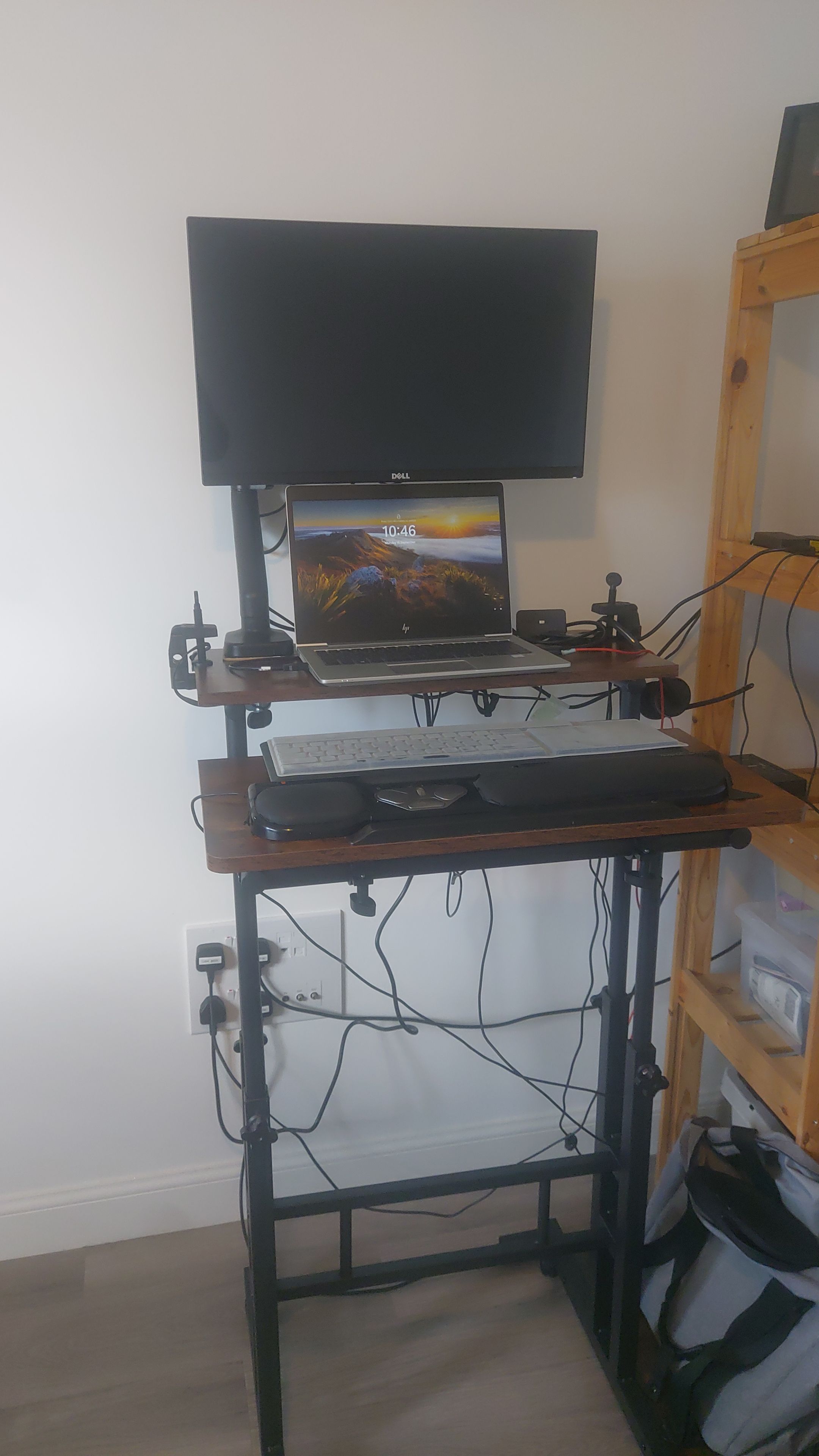
My new desk is just 600mm square, split horizontally, as seen below.

The desk set up in a standing position, with a monitor, laptop and keyboard on the tabletop parts. Towards the bottom is a bank of electric sockets; to the right of the picture, wooden shelves can be seen.

The far half of the tabletop can hold the monitor arm and laptop, while the keyboard can be at a different height and/or angle on the near half. It even has a built-in extension cable and LED lights, eliminating the need to use my own cable.

I’ve had to compromise slightly, with the wooden shelves providing a handy place for a few of the electrical adaptors. However, all the essential parts are present and the new setup fits much more snugly into the room.

Here’s to this lasting at least the next five years, if not much longer.

Backing Dvorak

If you look at the keyboard settings in your operating system, you’ll often spot several different layouts that the computer can understand. For instance: a French keyboard has its letters in a slightly different order, while a Russian one uses a completely different alphabet. Among them, you might see one marked ‘Dvorak’.

Despite its Czech name, the layout was invented by an American educational psychologist for use in typewriters. It’s well-known that the QWERTY design was introduced to slow down typists and avoid jamming the mechanisms, but by the 1930s, machines had improved to the point where fast typing wasn’t a problem. That’s where August Dvorak came in.

About a year or two after I began writing fiction, I began to develop Repetitive Strain Injury in my fingers, so I wanted to explore other options such as writing by hand, voice dictation, and a different keyboard.

With the vowels and most common consonants on the middle row, and the least often used on the bottom row, your fingers don’t need to travel so much. This is also the principle on which Scrabble letters are scored, but that’s a topic for a different time.

Dvorak does have downfalls. When I started using the system, I needed labels on the keys as reminders, graduating to a custom-built external keyboard, before I was able to rely on muscle memory. I also can’t change the keyboard on my workplace computer so I need to switch mentally between that and QWERTY.

Additionally, I mentioned how the layout was designed by an American, so a few of the keys don’t operate as expected, especially the pound sterling symbol.

To circumvent this, I use a program called AutoHotkey. On start-up, it loads a script that maps keypresses to other keys or to a subroutine. So if I press Ctrl+3, Windows can display the missing ‘£’ symbol rather than the ‘#’ produced by Shift+3. I have a few similar shortcuts for these special cases, although I still rely heavily on memory.

On balance, using the Dvorak keyboard has been a help more than a hindrance, and I’ll probably be using it well into the future.

Typing as Fast as You Can Speak

A typical computer uses a standard keyboard with more than 100 buttons. Many of these will have a secondary function, activated by modifiers such as Shift and Ctrl modifiers. This is more than enough to encode the entire alphabet in upper- and lowercase, numbers 0 to 9, a selection of everyday symbols, and common functions that interact with the operating system.

On the other hand, a stenotype machine has less than 25 buttons, which is not enough for all the letters of the English alphabet, never mind the numbers and punctuation marks. This is because the operator is more interested in the sound of a word than the spelling, and it allows a speed of more than 200 words per minute while moving the hands as little as possible.

Incidentally, the one punctuation mark on the device is an asterisk, used to mark corrections. In some messaging applications, where messages can’t be recalled, users will typically type an asterisk underneath, followed by the corrected word underneath.

However, the stenotype is now decades old and technology has now moved beyond that. Below is a video about live subtitling for proceedings in Parliament.

A video hosted on YouTube with an overview of how subtitles are produced for Parliamentary sessions.

In this application, voice recognition is used. However, it’s far easier to program a computer to understand just one voice instead of many, so an operator listens through headphones to the words spoken on TV and repeats them.

You’ll notice from the video that the operator speaks in something of a monotone regardless of how passionate the MPs are feeling, and this helps the software to provide a consistent result. Punctuation also needs to be added manually, not to mention switching between different people; colour codes are often used to help viewers work out which person said what.

Such software is also available for home users. For a period when I had RSI, I used Dragon NaturallySpeaking to give my fingers a rest. It worked to a high standard, I found, even straight out of the box and with a Scottish accent. However, it produces its best results when connected to the Internet, as it can benefit from deep learning techniques. If it can’t, the audio is processed locally and there’s a noticeable decrease in quality.

Dvorak Devotee

One of the greatest writing-related discoveries I’ve made in the last 15 years is the Dvorak keyboard layout.

The letters are arranged in such a way that the most common ones are on the middle row – including all the vowels – and you don’t need to stretch as far for a full-stop or a comma. You can read more about the improvements made in this BBC News article. The inventor designed his system decades before the personal computer revolution, yet it’s natively supported on both Windows and Mac.

The hardware is another story. While I do have a custom-made Dvorak keyboard, it’s not always practical to take it with me. Fortunately, I can touch-type and I’ve learnt where the letters are by sheer muscle memory. At one point I could even mentally switch between that and QWERTY, depending on whether I was at home or work. For the last 18 months, I’d been able to use exclusively Dvorak in both places.

That changed yesterday. I started a new job and was issued with a new laptop. It’s similar to my own and runs Windows, but the administrator has jammed it into QWERTY mode only. I’ve therefore spent the last 24 hours relearning the most popular layout in the Anglosphere.

In theory, this should be easy because the letter on the keyboard matches the letter you want to type. However, when I learnt touch-typing at school, it was drilled into me that you look at the screen, not your fingers, so I have to remember to look down from time to time. Today has produced better results than yesterday, but it’s going to take some time before I can once again switch flawlessly between QWERTY and Dvorak.

Repetitive Strain Recovery

It was around the time of the 2014 Commonwealth Games when I really started notice the strain in my fingers. It had started off weeks before as a pain in the middle finger of the hand I used to click a computer mouse, but as I was writing humorous commentary about the opening ceremony to online friends, it was difficult to keep going.

The cause was obvious. I had a job where I was typing for most of the day, and I was using a computer outside of working hours. As such, something had to change before my fingers dropped off and I couldn’t write any stories or poems.

One practical adjustment I could make at work was to apply for a roller mouse. The roller is in a fixed place, and it can be controlled with different parts of your hand to avoid straining one place. I’d already been using AutoCorrect to save keystrokes when entering common phrases and jargon.

Outside of work, however, there was more freedom. I started to write my first drafts by hand, making use of the lined pages in my diary. To type up the second draft, I learnt how to use voice recognition. Used properly, speech-to-text software has a good level of accuracy even out of the box, but it’s important to exercise patience while it learns the way you speak.

Furthermore, I found that lifting free weights at the gym relieved the pain in my fingers temporarily. As I usually go at lunchtime, this helped me out in the afternoons.

This year, I’ve realised that by making these changes, I can now type for much longer without my hands hurting. However, I still keep my other measures in place as I don’t want another five or six years of beating RSI again.

Captioning the Moment

By law, UK broadcasters must make sure that a minimum percentage of their output is subtitled. This week, I’ve been finding out how this is done.

Traditionally, a typist would be listering to the broadcast and entering the words using a stenography machine. These have a keyboard that accepts syllables rather than individual letters, and complete words would appear to viewers.

However, this method has been superseded by a technique called respeaking. Rather than a typist entering the words by hand, they listen to the audio and speak it into another microphone, where it’s converted into text by software.

So why not simply take the broadcast audio output and convert that directly into text? The computer would have to work out what is speech and to filter out any background noise such as applause, then it would need to be able to accommodate for different people’s accents and mannerisms. Lord Prescott, for instance, is notorious for not finishing his sentences.

Even today, a person can identify the correct content much more effectively than a machine, and can cope better with understanding one voice than thousands.

Respeaking also has two advantages over traditional stenography:

  1. It can take between two and five years of full-time training to use the keyboard at 200 words per minute. Respeakers can reach trainee standard after six months.
  2. The typist’s fingers are left free to make other adjustments, such as the position and colour of the text on the screen.

I mentioned a couple of weeks ago that I use Dragon NaturallySpeaking to assist me in my own writing. While writing this entry, I opened too many browser tabs and other applications, leaving not enough memory to run the software. I could have rebooted the computer to free up space, but I instead typed it out by hand.

Some Salvaged Scribbles.

A few days after my handwritten entry last week, I was looking for something in my bottom drawer, when I discovered an old notepad. It’s nothing special; it’s a Tesco Value spiral-bound A4 pad with a slightly ripped cover.

I’ve used a quarter of its 80 pages, and most of it is taken up with attempts to expand on a fragment of poetry that I tried to expand into a song, although there is also a brief novel idea, pages of free writing, and a poem on the topic of my own handwriting.

Of these, I only consider the poem be a decent piece of work. As for the rest, I know what I was trying to express, but I didn’t have the techniques at my disposal to do it properly. But looking at the content, I’ve calculated that I last wrote in this notebook in September 2009, more than a year before I began writing. I’m therefore not surprised about the quality.

My filing system
My filing system

Yesterday, I discovered other half-completed notebooks, but none as full or detailed as this one. I’ve noticed I rarely reached the last page, although I’m more than likely to complete my current ones. Also, there are hardly any drawings or even doodles, just text.

But the one notebook I would like to look at again is missing, believed lost. At my very first National Novel Writing Month meeting, my laptop battery died. I had to rush out and buy a notepad and mechanical pencil so I could continue my story. I had it about a year before its disappearance, and it contains drafts of my first novel, and some of my earliest stories. I don’t think I’ve lost anything, but I might have.

I know I’m not the only writer with notepads dotted about, and I’d like to hear about yours. Do you have any hidden in a drawer somewhere? What did you discover when you pulled them out again? Have you misplaced an important story you wish you could recover?