Typing as Fast as You Can Speak

A typical computer uses a standard keyboard with more than 100 buttons. Many of these will have a secondary function, activated by modifiers such as Shift and Ctrl modifiers. This is more than enough to encode the entire alphabet in upper- and lowercase, numbers 0 to 9, a selection of everyday symbols, and common functions that interact with the operating system.

On the other hand, a stenotype machine has less than 25 buttons, which is not enough for all the letters of the English alphabet, never mind the numbers and punctuation marks. This is because the operator is more interested in the sound of a word than the spelling, and it allows a speed of more than 200 words per minute while moving the hands as little as possible.

Incidentally, the one punctuation mark on the device is an asterisk, used to mark corrections. In some messaging applications, where messages can’t be recalled, users will typically type an asterisk underneath, followed by the corrected word underneath.

However, the stenotype is now decades old and technology has now moved beyond that. Below is a video about live subtitling for proceedings in Parliament.

A video hosted on YouTube with an overview of how subtitles are produced for Parliamentary sessions.

In this application, voice recognition is used. However, it’s far easier to program a computer to understand just one voice instead of many, so an operator listens through headphones to the words spoken on TV and repeats them.

You’ll notice from the video that the operator speaks in something of a monotone regardless of how passionate the MPs are feeling, and this helps the software to provide a consistent result. Punctuation also needs to be added manually, not to mention switching between different people; colour codes are often used to help viewers work out which person said what.

Such software is also available for home users. For a period when I had RSI, I used Dragon NaturallySpeaking to give my fingers a rest. It worked to a high standard, I found, even straight out of the box and with a Scottish accent. However, it produces its best results when connected to the Internet, as it can benefit from deep learning techniques. If it can’t, the audio is processed locally and there’s a noticeable decrease in quality.

Must Dash

This week, I wanted to pick up on a small point from last week’s entry about how my use of punctuation differs from what Grammarly considers correct. I’m focussing not on commas, but hyphens and dashes.

There are three main lengths of horizontal line used as punctuation in English. The shortest of these is the hyphen (-), the mid-length is called an en-dash (–), and the third is an em-dash (—). For the purposes of this entry, we’ll ignore the underscore (_) as this is used only for computer programming and other specialist purposes. Now let’s look at how these three marks are used.

Hyphen (-)

A hyphen connects two words or two parts of words together, and touches the letters on either side. It’s done to avoid ambiguity or to suggest a certain pronounciation.

Consider how, ‘I re-sent your e-mail’ communicates something very different from ‘I resent your e-mail.’

You might also note that ‘e-mail’ is hyphenated here, indicating that the stress should be placed on the first syllable. The more common form these days is ’email’, but modern readers understand the pronounciation without the hyphen as a guide.

A hyphen can also be used to show a range; eg, ‘The Hundred Years’ War: 1337-1453′.

En-dash (–)

This takes its name from the width of the letter ‘n’ in the first printing presses, although the width varies on modern machines, and it has several uses.

It can be used as an alternative to the hyphen to show a range; eg, ‘Normal core body temperature: 97–99˚F’. But that’s the only crossover in usage.

On this blog, I frequently use the en-dash in place of brackets – to interrupt one thought with another – and you can easily find them in previous entries. In this case, the dash doesn’t touch the letters that surround it.

You don’t even need to come back to the original thought, as an en-dash will quite happily take the reader in a different direction – and leave them there.

Em-dash (—)

The em-dash takes its name from the width of a letter ‘m’. Like the en-dash, this punctuation breaks up a sentence, but with more urgency.

Recently, I wrote in a comment, ‘There were two blunders—sorry, happy accidents—in the pictures below.’ I could have used en-dashes there, but this construction implies a slightly frantic energy. The em-dash always touches the letters that surround it.

Unlike the en-dash, however, this punctuation mark isn’t suitable for showing a range.

Giving Quality Feedback on Poetry

It’s something of a badge of honour when someone asks me to read over a poem they’ve written and to provide feedback. So I was only too happy to oblige when a friend sent me a three-part piece she wasn’t sure about.

On receipt of a poem, I first of all go through a mental checklist of features I would expect to see. As I write, I realise this is the first time I’ve written down these features, so I might return to this topic and make amendments.


Punctuation

Although poetry often employs types of line breaks that don’t appear in prose, it’s a convention that sentences are still punctuated in the same way with commas, full stops and other marks.

Capitalisation

Before 1900 or so, the first letter of a new line was capitalised whether or not it was at the beginning of a new sentence. Beginning in the 20th century, however, that first letter is not usually capitalised unless it also begins a sentence.

Forced rhymes

Not all poetry rhymes, but when a rhyme is included, it’s conventional to make it sound as natural as possible. I hear too many cases where the poet has written in rhyming couplets and the order of the words in the second line of each couplet is altered to make it fit with the first.


After those three checks, I consider other aspects such as word choice, whether any clichés have been used, the rhythm of the piece, and how the structure might be amended for greater impact on the reader.

But these are only conventions and they can be broken. In the second part of her poem, my friend eschewed punctuation and capitalisation so it read like work from Allen Ginsberg or E E Cummings. If you’re planning to break poetic convention, the best way is to make it clear to the reader that you’re not following the rules.

Overall, I was pleased with the piece my friend sent, and I look forward to hearing it in its final form.

Your Weekly Writing Update by Grammarly

A few weeks ago, I started a subscription to Grammarly.  As I sometimes churn out my writing work quickly, especially blog posts, it’s a useful tool to pick up any spelling or grammar errors that creep in.

There’s already a proprietary checker in Microsoft Word, and it’s possible to download browser extensions that perform a similar function. But Grammarly software is consistent in Word, in your browser, and anywhere else you type on your computer. It doesn’t, however, seem to be available for mobile devices.

Every week, I’m sent a summary of how well or badly I’ve performed in my spelling and grammar. Here are selected stats from 06 February to 12 February.

  • You wrote more words than 96% of Grammarly users did.
  • You were more accurate than 82% of Grammarly users.
  • You have a larger vocabulary than 97% of Grammarly users.

So far, I feel like a latter-day Shakespeare. However, it’s not all happy news:

Top 3 grammar mistakes

1. Missing comma in compound sentence: 44 mistakes.
2. Incorrect use of comma: 15 mistakes
3. Missing comma(s) with interrupter: 10 mistakes

Grammarly and I can’t seem to come to an agreement on this issue.

Sometimes it allows the use of the Oxford comma in a list, but sometimes I’m told to take it out. Similarly, I’m often shouted at for placing a comma before and in a sentence, but it’s occasionally required to stay in.

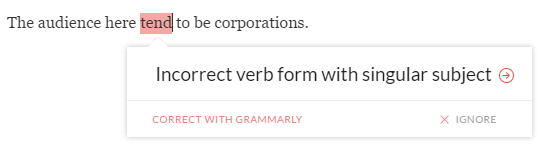
I’ve also discovered a problem with the verb form in the following sentence:

  • The audience here tends to be corporations.

I’m advised this isn’t correct:

tends

So I duly drop the final letter to make the verb agree with the plural subject corporations. Then I’m told:

tend

Now the verb form is incorrect because it doesn’t agree with the singular audience. And so we go around in a loop. There is a facility to add custom spellings or to ignore a suggestion, but no way to let the software learn your writing style or to flag up false positives.

Ultimately, the writer has to determine whether the words that are written, or the way in which they’re written, are suitable for the intended purpose. Grammarly is a tool that uses algorithms to apply the conventional rules of English; it’s not a textbook that must be followed precisely.